
Tesla Ownership Tips That Make Life Easier
So, you've got a Tesla, huh? That's pretty cool. Now that you're behind the wheel of something a bit different, you might be wondering how to get the most out of it. Don't worry, it's not as complicated as it seems. We've put together some straightforward Tesla ownership tips that should make your life a little easier, whether you're just starting out or have been driving one for a while. Think of this as your friendly guide to making your Tesla experience even better.
Key Takeaways
Get familiar with your Tesla's main features right away, like setting up your profile and understanding the screen controls. It makes daily driving much smoother.
Learn how the driving aids and Autopilot work. They're there to help, but knowing their limits is important for safety.
Figure out a charging plan that works for you, whether it's at home or using Superchargers on the go. This avoids any range anxiety.
Consider adding some simple accessories. Things like organizers or better floor mats can really make a difference in keeping your car tidy and comfortable.
Use the Tesla app! It's a handy tool for checking your car's status, pre-conditioning the cabin, and even finding charging spots.
Mastering Your New Tesla
Getting a new Tesla is exciting, and there's a bit of a learning curve. But don't worry, getting the hang of it is easier than you might think. Let's break down how to get started.
Setting Up Essential Features
When you first get your Tesla, there are a few things you'll want to set up right away to make your driving experience smoother. Think of it like setting up your phone for the first time – you want the basics in place.
Connect Your Phone: This is key for calls, music, and using the Tesla app. Go to the Bluetooth settings on your car's screen and pair your phone. Make sure your phone's Bluetooth is on!
Adjust Your Seat and Mirrors: Take a few minutes to get your seating position and mirror angles just right. This isn't just about comfort; it's important for visibility and using the car's features safely.
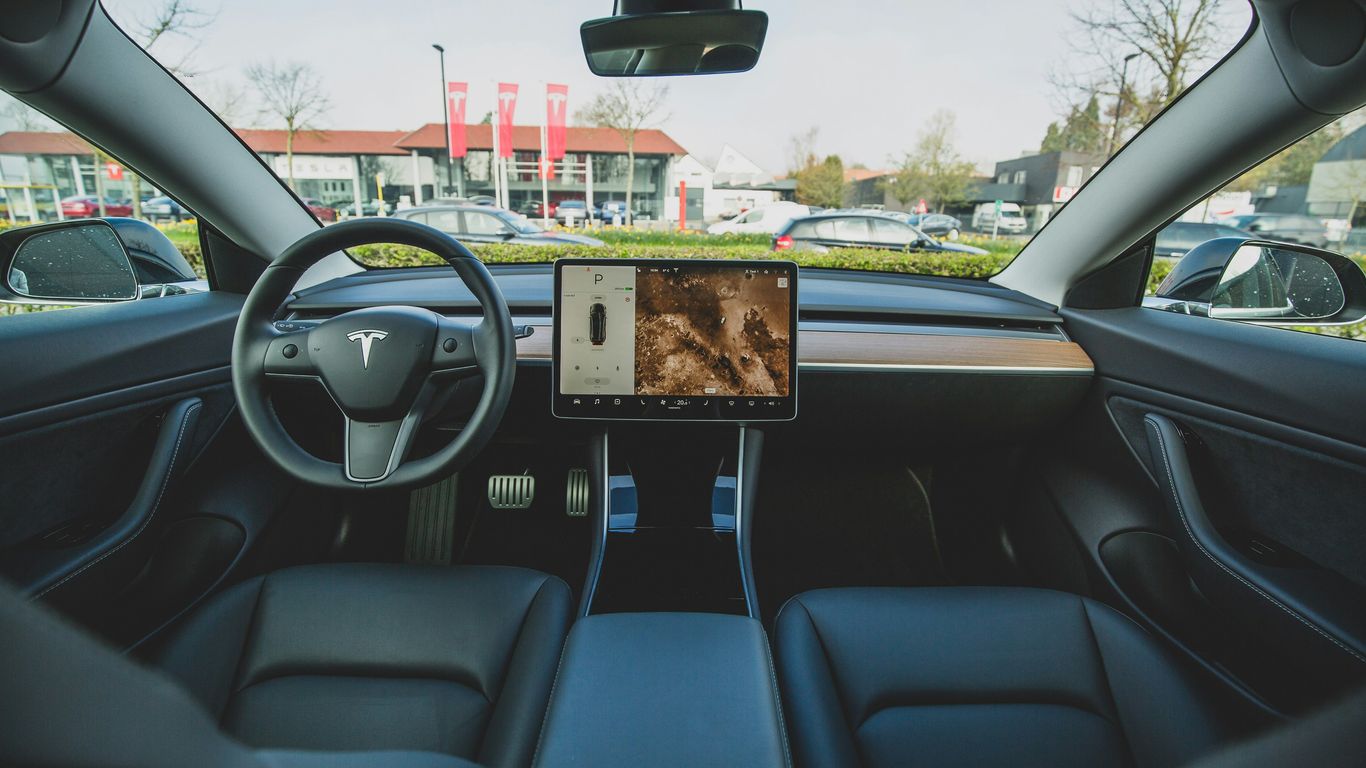
Familiarize Yourself with the Screen: The central touchscreen is your command center. Spend some time just tapping around to see where everything is – climate controls, navigation, media, and settings. You don't need to memorize it all now, just get a feel for the layout.
Set Up Your Charging: If you have a home charger, make sure it's set up and working. If not, look into your charging options. Understanding how and where you'll charge is a big part of Tesla ownership.
Getting comfortable with the basic settings before you hit the road for a long drive will save you a lot of hassle. It's better to figure out how to turn on the wipers while parked than while you're dealing with sudden rain.
Understanding Autopilot and Driving Aids
Tesla's Autopilot and other driver assistance features are pretty advanced, but it's important to know what they do and, more importantly, what they don't do. They are designed to help, not to take over completely.
Autopilot: This system can help steer, accelerate, and brake your car in certain situations, like on highways. It's not a self-driving system. You must keep your hands on the wheel and pay attention to the road at all times. The car will remind you to do this.
Traffic-Aware Cruise Control: This is part of Autopilot. It matches your speed to the traffic around you, slowing down when the car in front slows down and speeding up when it speeds up.
Autosteer: This feature helps keep your car centered in its lane. It works best on clearly marked roads.
Full Self-Driving (FSD) Capability: This is an optional package that adds more features over time through software updates. It's still under development and requires constant driver supervision.
Remember, these systems are aids. Always be ready to take control. Think of them as a helpful co-pilot, not an autopilot.
Optimizing Your Charging Routine
Charging is a big part of owning an electric car. Making it a habit that fits your life is key.
Home Charging: For most people, charging overnight at home is the most convenient. Plug in when you get home, and wake up to a full battery. This is usually the cheapest way to charge too.
Supercharging: Tesla's Supercharger network is great for road trips or when you need a quick charge. You can find them using the car's navigation system. Just plug in, and the car handles the payment automatically.
Public Charging: You'll also find other public charging stations. Some might require an app or a specific connector, so it's good to be aware of them.
Try to charge your car regularly, just like you would fill up a gas tank. Don't wait until it's almost empty. This helps keep the battery healthy and ensures you always have enough range for your daily needs.
Enhancing Your Tesla Experience
Once you've got the basics down, it's time to really make your Tesla feel like your Tesla. This section is all about those little touches and smart additions that can make a big difference in your day-to-day driving and ownership.
Interior Organization Solutions
Teslas are known for their minimalist interiors, which is great, but sometimes that means there isn't a perfect spot for everything. Keeping your cabin tidy can really improve your driving experience. Think about adding organizers for your center console, door pockets, or even the space under the screen. These can help keep your phone, sunglasses, charging cables, and other small items from rolling around.
Center Console Organizers: These trays and dividers fit into your existing console, creating separate compartments. It's amazing how much more usable space you gain.
Door Side Storage Boxes: These slide into your door panels, giving you a dedicated spot for things you need quick access to, like your phone or wallet.
Under-Screen Trays: The area below the main display can be a bit of a black hole. A simple tray here is perfect for storing less frequently used items.
A well-organized car isn't just about looks; it's about reducing distractions and making it easier to find what you need when you need it. It makes the whole driving experience feel more relaxed.
Exterior Customization Options
While Teslas have a distinct look, there are ways to add a personal touch to the outside. Many owners opt for subtle changes that can really change the car's profile. Things like different wheel covers, window tint, or even a small spoiler can make your car stand out.
Spoilers: A carbon fiber spoiler can add a sporty look and might even offer some aerodynamic benefits. Installation is often straightforward.
Window Tint: Beyond aesthetics, tint can help keep the cabin cooler and reduce glare.
Mud Flaps: These are practical, especially if you live in an area with rough roads or lots of rain and snow. They help protect your car's paint from road debris.
Comfort and Convenience Accessories
Sometimes, the best upgrades are the ones that just make you more comfortable. Think about things that make long drives easier or protect your investment.
Screen Protectors: Protecting that large central touchscreen is a smart move. They prevent scratches and smudges, keeping the display looking new. Many are easy to install yourself.
Floor Mats: All-weather floor mats are a game-changer, especially if you live somewhere with messy weather. They catch dirt, water, and snow, and are usually super easy to clean.
Headrest Pillows: For longer trips, a comfortable neck pillow can make a world of difference, especially when using Autopilot.
Adding these kinds of accessories can really make your Tesla feel more personalized and practical for your specific needs. It's about making the car work better for you. You can find a lot of great options for your Tesla model that fit well and improve the overall experience.
Maintaining Your Tesla
Keeping your Tesla in good shape is pretty straightforward, but there are a few things to keep in mind to make sure it runs well and looks good for years to come. It's not just about washing it; it's about protecting the paint, keeping the inside clean, and using the right products.
Protecting Your Vehicle's Exterior
The paint on your Tesla is one of its most noticeable features, and it's also one of the most vulnerable. Road grime, bird droppings, and even just parking under trees can take a toll. A good wash routine is key. I usually aim for a thorough wash every couple of weeks, or more often if it gets really dirty.
Washing: Start with a good rinse to get loose dirt off. Then, use a quality car wash soap and a microfiber wash mitt. Always wash from top to bottom. Rinse the mitt frequently to avoid scratching the paint.
Drying: Use clean microfiber drying towels. Pat the car dry or use a gentle drying motion. Avoid letting it air dry, as this can leave water spots.
Protection: After washing and drying, consider applying a wax or sealant. This adds a layer of protection against the elements and makes future washes easier. Ceramic coatings are also an option for longer-lasting protection, though they can be more involved to apply.
Wheels and Tires: Don't forget your wheels and tires. Use a dedicated wheel cleaner that's safe for your specific wheel finish. Tire dressing can make them look sharp and also offer some protection.
Keeping the Interior Pristine
The inside of your Tesla is where you spend most of your time, so keeping it clean makes a big difference. The minimalist design means fewer places for dust to hide, but spills and general wear and tear can still happen.
Flooring: All-weather floor mats are a lifesaver, especially if you live in an area with rain or snow. They catch dirt and moisture and are usually easy to remove and clean.
Seats: Depending on your interior material, cleaning methods will vary. For most, a damp microfiber cloth is enough for regular wipe-downs. For tougher spots, a mild interior cleaner can work wonders.
Screens and Surfaces: The large touchscreen and dashboard surfaces can attract fingerprints. A dedicated screen cleaner or a slightly damp microfiber cloth works best. Avoid harsh chemicals that could damage the finish.
Organization: While not strictly cleaning, keeping things organized prevents clutter that can get ground into carpets or make cleaning harder. Small organizers for the center console or door pockets can help.
Essential Cleaning and Care Products
Having the right tools makes the job much easier. You don't need a whole garage full of stuff, but a few key items will go a long way.
Microfiber Towels: Get a good stack of these. They're great for washing, drying, and interior cleaning without scratching.
pH-Neutral Car Wash Soap: This is important so it doesn't strip away any protective layers you might have on your paint.
Wheel Cleaner: Make sure it's safe for your specific wheel type.
Interior Cleaner: A gentle, all-purpose interior cleaner is usually sufficient.
Glass Cleaner: For streak-free windows.
Optional: A good quality wax or sealant, tire dressing, and a portable vacuum cleaner for quick cleanups.
Taking a little time regularly to maintain your Tesla's exterior and interior will not only keep it looking great but also help preserve its value over time. It's about simple, consistent care rather than big, infrequent efforts.
Navigating Tesla Technology
Tesla's tech can seem a bit overwhelming at first, but once you get the hang of it, it really makes driving easier. Think of it like learning a new smartphone – there's a bit of a learning curve, but then it becomes second nature.
Leveraging Voice Commands Effectively
Voice commands are your best friend in a Tesla. Instead of fiddling with the touchscreen while driving, just speak your command. You can control a lot of things this way, from adjusting the temperature to changing the music or getting directions. It's all about keeping your eyes on the road and your hands on the wheel.
Here are some common things you can say:
Navigate to [address or place name]
"Play [song or artist]"
"Set temperature to 70 degrees"
"Open the frunk"
"Turn on windshield wipers"
It's worth spending a few minutes to explore the full list of commands. You might be surprised at how much you can do just by talking to your car. For a quick reference, you can find a comprehensive list of commands online Tesla Voice Commands.
Exploring Hidden Features
Teslas are packed with features that aren't always obvious. Some are tucked away in menus, while others you might not even know exist. For example, did you know you can customize the display to show different information or set up 'shortcuts' for frequently used actions? Exploring these can really personalize your driving experience. You can find some great tips on discovering these by checking out resources that detail hidden features within the Tesla app.
Utilizing the Tesla App
The Tesla app is like a remote control for your car. You can check your charge status, pre-condition the cabin temperature before you get in, lock or unlock the doors, and even summon your car in tight parking spots. It's incredibly useful for managing your vehicle when you're not even in it. For new owners, getting familiar with the app is one of the first things you should do to maximize your driving experience.
The app also offers advanced features like smart charging, which can help save you money by charging when electricity rates are lower. It's a small thing, but it adds up over time and is just another way Tesla technology works to make ownership simpler.
Planning Your Journeys
Taking your Tesla on a longer trip is exciting, but it does require a bit of forethought. Unlike gas cars, you can't just pull into any station and fill up in minutes. Planning ahead is key to a smooth electric vehicle adventure.
Maximizing Range on Road Trips
Getting the most miles out of a single charge is all about smart driving and preparation. Think about your route beforehand and try to avoid steep hills if possible, as they use more energy. Keeping your speed steady, especially on highways, also helps a lot. You'll notice a difference if you can keep it around 65-70 mph instead of pushing it faster.
Here are a few tips to keep in mind:
Precondition your battery: Before a long drive, especially in colder weather, use the car's preconditioning feature. This warms up the battery to its optimal temperature for better efficiency and faster charging.
Minimize accessory use: While the climate control is important, excessive use of heating or AC can impact range. Try using seat heaters or coolers first, as they use less energy than heating or cooling the entire cabin.
Drive smoothly: Avoid sudden acceleration and hard braking. Gentle inputs on the accelerator and anticipating stops will help you conserve energy.
Check tire pressure: Properly inflated tires reduce rolling resistance, which directly translates to better range.
Finding and Using Superchargers
Tesla's Supercharger network is pretty amazing, and the car's built-in navigation system is your best friend here. When you set a destination, the car will automatically plan Supercharger stops if needed. It even tells you how long you're expected to charge. This feature really takes the guesswork out of long trips. You can also check the Tesla app for real-time Supercharger availability and station details.
When you arrive at a Supercharger:
Park: Pull into an available stall. The car will automatically communicate with the charger.
Plug in: Connect the charging cable to your car's charge port.
Charge: The charging session will begin automatically. You can monitor the progress on your car's screen or the Tesla app.
Unplug: Once charging is complete or you've reached your desired state of charge, simply unplug the cable. Payment is handled automatically through your Tesla account.
Planning Charging Stops
Planning your charging stops is more than just finding a Supercharger; it's about making the most of your downtime. Tesla's Trip Planner is designed to help with this, suggesting stops that are not only convenient but also often the fastest available chargers. This system aims to reduce wait times, potentially saving you significant time on longer journeys. Remember that charging isn't just about getting back to 100%; often, charging to about 80% is much faster and sufficient for the next leg of your trip. The car's navigation will guide you on the optimal charge level needed to reach your next destination or Supercharger. It's a good idea to have a general idea of your route and potential charging locations before you leave, especially if you're traveling to areas with fewer charging options. This preparation is key for a successful and enjoyable electric vehicle adventure.
Smart Accessory Choices
Must-Have Accessories for New Owners
So, you've got your shiny new Tesla, and it's pretty awesome as is. But let's be real, there are a few things that can make your daily drives even better. For starters, think about organization. Things can get a bit jumbled in the center console or door pockets pretty quickly. A good organizer can make a huge difference. Also, protecting that big touchscreen is a good idea. A screen protector is a small investment that can save you a headache down the line. And if you're planning on carrying anything in the trunk, like groceries or gear, some all-weather mats or a trunk liner are lifesavers for keeping things clean.
Tech-Focused Gadgets for Your Tesla
If you're a bit of a tech enthusiast, there are some cool gadgets that can up your Tesla game. Wireless phone chargers are almost a no-brainer these days, keeping your phone topped up without fumbling with cables. For those longer trips or just to keep the back seat passengers entertained, a rear entertainment screen can be a fun addition. And don't forget about dashcams; they're becoming increasingly popular for peace of mind on the road. You can find a lot of these innovative gadgets at places that specialize in EV accessories.
Practical Additions for Daily Use
Beyond the flashy tech, some accessories are just plain practical. A good set of all-weather floor mats is a must, especially if you live somewhere with rough weather or have kids and pets. They make cleaning up spills and dirt so much easier. Mud flaps can also be a smart choice to protect your car's paint from road debris. And for those who want a bit more comfort on longer drives, consider neck pillows designed specifically for Tesla seats. They really do make a difference on those extended road trips. Finding quality items is key, and many owners rely on sites that have tested EV accessories to ensure they work well.
Looking for cool add-ons for your Tesla? We've got you covered with awesome gear for every model, from floor mats to seat covers. Make your ride even better! Check out our top picks on our website today.
Wrapping It Up
So, there you have it. Owning a Tesla is pretty cool, but adding a few smart accessories can really make things smoother. We've gone over some simple ways to keep your car tidy, protect it, and just generally make your day-to-day driving a bit easier. It’s not about making the car perfect, but about making it work better for you. Think of these as small upgrades that add up to a much nicer ownership experience. Happy driving!
Frequently Asked Questions
How do I set up my new Tesla?
Getting your Tesla ready is pretty simple! First, download the Tesla app on your phone and log in. The app will guide you through connecting your phone to the car, setting up your charging preferences, and even adjusting basic settings like climate control. You'll also want to familiarize yourself with the main touchscreen – it controls almost everything, from navigation to music.
What is Autopilot, and how does it work?
Autopilot is a driver assistance system that helps you steer, brake, and accelerate. It's not a fully self-driving system, so you always need to pay attention and keep your hands on the wheel. It's great for highway driving, making long trips feel less tiring. Think of it as a helpful co-pilot, not a replacement for you!
What's the best way to charge my Tesla?
For daily charging, plugging in at home overnight using a home charger is usually the easiest and cheapest. If you're on a longer trip, Tesla's Supercharger network is super fast and convenient. Just plug in, and the car automatically starts charging and handles the payment. Planning your charging stops is key for road trips.
Are there any accessories that really help organize the inside of a Tesla?
Yes, definitely! Many owners find console organizers, glove box trays, and door pocket inserts super helpful for keeping things tidy. These little additions make it much easier to find small items like keys, sunglasses, or charging cables without digging around.
How can I make my Tesla's battery last longer on a trip?
To get the most miles out of your battery, try to drive smoothly and avoid sudden acceleration or hard braking. Keeping your speed moderate on the highway also helps a lot. Using climate control efficiently, like pre-conditioning the car while it's plugged in, can save battery too. Also, remember that using Autopilot can sometimes be more efficient than manual driving.
What are some essential cleaning products for a Tesla?
Keeping your Tesla clean is important! You'll want good microfiber cloths for wiping down the interior and exterior without scratching. A quality car wash soap and a good interior cleaner for the screens and surfaces are also must-haves. For the exterior, a ceramic coating or a good wax will help protect the paint.



Comments