
Tesla Delivery Checklist: What to Inspect Before You Accept
So, you're about to pick up your shiny new Tesla. Exciting stuff! But before you drive off into the sunset, there are a few things you'll want to check. Think of this as your personal Tesla Delivery Checklist. It's not super complicated, but being prepared can save you a headache later. We'll go through what to look at, from the outside all the way to the software inside.
Key Takeaways
Do a walk-around of the car's exterior, looking closely at the paint for any marks and checking that all the doors and panels line up right.
Inside, give the seats and dashboard a good look. Make sure everything feels right and that the screens and controls work when you touch them.
Test out the car's basic functions like the lights, wipers, and air conditioning to make sure they're all working as they should.
Check the charging port for any damage and confirm the battery has a decent charge. Also, look over the charging cable that comes with it.
Review the paperwork, confirm the software version is up-to-date, and understand the warranty details before you sign anything.
Exterior Inspection
Alright, let's talk about the outside of your shiny new Tesla. This is the first impression, and honestly, it's important. You want everything to look just right before you drive off the lot.
Paint Condition
First up, the paint. Give the whole car a good once-over. Look for any scratches, dings, or weird spots. Sometimes, especially on darker colors, you might see what looks like a swirl mark, which is basically a tiny scratch from the cleaning process. Also, check for any orange peel effect, which is when the paint isn't perfectly smooth. It's usually subtle, but if you see it, make a note. A flawless finish is what you're aiming for.
Panel Gaps and Alignment
Next, check out how the body panels line up. Open and close all the doors, the trunk, and the frunk. Do they close smoothly? Are the gaps between the panels consistent all the way around? You don't want to see one side with a big gap and the other side practically touching. This applies to the hood, trunk, doors, and even the bumpers. It's all about that clean, uniform look. A quick way to check is to look down the length of the car from a distance; any wonky lines will stand out.
Glass and Seals
Don't forget the glass and the rubber seals around it. Check the windshield, side windows, and the rear glass for any chips or cracks. Run your hand along the edges of the windows and doors. The rubber seals should be smooth and properly seated. If they look pinched, torn, or are sticking out in places, that could lead to wind noise or water leaks down the road. It's these little details that make a big difference in the long run. You can use a simple checklist to keep track of everything you've inspected.
Interior Examination
Upholstery and Trim
Take a good look at all the seats, door panels, and the headliner. Run your hands over the surfaces to feel for any snags, tears, or unusual bumps. Check the stitching on the seats and any trim pieces to make sure it's neat and consistent. Sometimes, especially with lighter colors, you might find small marks or scuffs from handling during transport. It's important to catch these early.
Seats: Inspect for stains, rips, or uneven wear. Press down on the cushions to ensure they feel firm and supportive.
Door Panels: Look for scratches, loose trim pieces, or any damage to the armrests.
Headliner: Check for sagging, stains, or any signs of impact.
Dashboard and Center Console
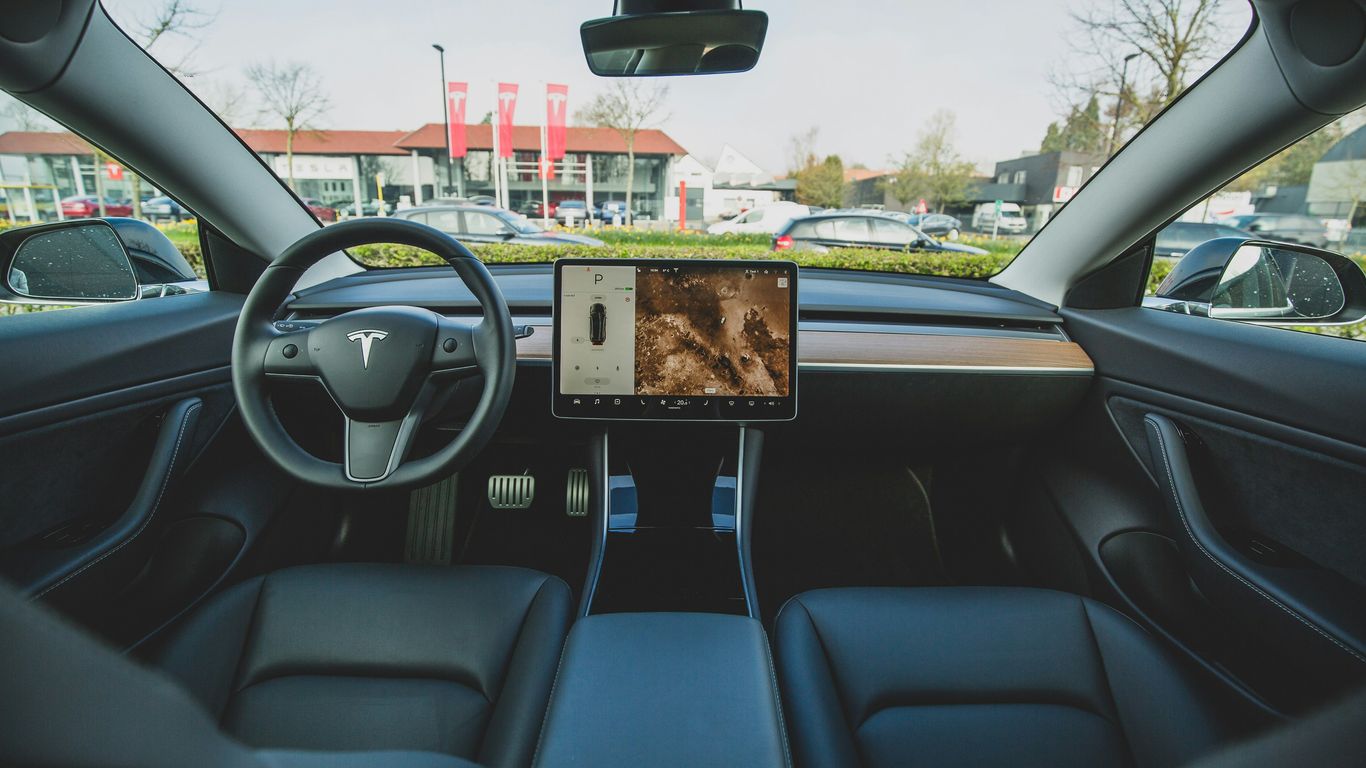
This is where all the tech lives, so give it a thorough once-over. Make sure all the surfaces are clean and free of scratches. Pay attention to the areas around the screens and buttons. Sometimes, protective films are left on, which is fine, but make sure there are no actual scratches underneath. Check that all the little storage compartments and cup holders open and close smoothly. A quick way to check for any minor issues is to use a comprehensive checklist to guide your inspection.
Infotainment System Functionality
Turn on the car and fire up the main screen. Test out the touchscreen responsiveness – it should feel quick and fluid. Play with the navigation system, check the radio, and try connecting your phone via Bluetooth. Make sure the speakers are working by playing some audio. It's also a good idea to check the climate control interface on the screen to ensure all the vents and temperature settings respond correctly. Don't forget to look for any dead pixels or discoloration on the display itself. A screen protector can help keep this area looking new, but you want to accept the car with a perfect screen to begin with.
The interior of your Tesla is where you'll spend most of your time. While minor imperfections might seem small, they can become more noticeable with daily use. A careful inspection now can save you hassle later.
Functional Checks
Now that we've looked at the outside and inside, it's time to make sure everything actually works. This is where you get to play with your new toy a bit before signing on the dotted line.
Lights and Signals
This one's pretty straightforward. You'll want to check all the exterior lights. That means headlights (low and high beams), taillights, brake lights, and turn signals (front and rear, left and right). Don't forget the hazard lights either. It's also a good idea to check the interior dome lights and any ambient lighting if your model has it. Make sure every single light illuminates correctly and without any flickering.
Climate Control System
Turn on the car and test the climate control. Crank up the AC to its coldest setting and then blast the heat to its warmest. Feel the air coming from all the vents – front, rear, and side. Check that the fan speed adjusts properly through all its settings. You want to make sure it's not making any weird noises and that the temperature change feels right.
Power Windows and Locks
Go around to each door and test the power windows. Roll them all the way down and then all the way back up. Listen for any grinding or sticking sounds. Then, test the power door locks. Lock all the doors from the driver's side and then unlock them. Do the same from each individual door's lock switch. It's a simple check, but you don't want to find out later that one of them is acting up.
It might seem like a lot, but taking a few extra minutes now to verify these basic functions can save you a headache down the road. Think of it as the final quality control before you officially own the car.
Charging and Battery
Charging Port Inspection
First things first, take a good look at the charging port. Make sure there's no visible damage, debris, or anything that looks out of place. It should be clean and the flap should open and close smoothly. This is where all the magic happens, so it needs to be in good shape.
Battery Charge Level
When you pick up your Tesla, it should have a decent charge. Ideally, it should be somewhere between 80% and 90%. This is good for the battery's long-term health. It's not great to store them at 100% for extended periods, and too low isn't ideal either. Check the screen to see the current percentage.
Charging Cable Condition
If a mobile connector or charging cable is included, give it a once-over. Look for any nicks, cuts, or damage to the cable itself or the connectors. Make sure it feels sturdy and the pins aren't bent. You'll want this to be in good working order for when you need to charge up. You can find all sorts of Tesla charging accessories if you need replacements or upgrades down the line, but for delivery, just check what's provided.
It's always a good idea to have a basic understanding of charging levels. Level 1 charging uses a standard wall outlet and is the slowest, while Level 2 uses a higher voltage outlet and is much faster. Your Tesla will come with a mobile connector that can do both, depending on the adapter you use.
Documentation and Software
This section is all about the paperwork and the brains behind your new Tesla. It might not be as exciting as checking the paint, but it's super important. Making sure you have all the right documents and that the software is up-to-date means you're ready to roll.
Owner's Manual Review
Don't just toss the owner's manual in the glove box! Take some time to flip through it. It's packed with info about your specific car's features, how to use them, and what those little warning lights actually mean. Think of it as your car's instruction book. You'll want to know how to adjust things like regenerative braking or understand the different drive modes. It’s a good idea to familiarize yourself with the basic functions before you really start driving.
Software Version Check
Teslas are basically computers on wheels, so the software is a big deal. You'll want to see what version your car is running. Sometimes, there are updates available right at delivery, or you might be told about upcoming ones. You can usually find this information on the car's main screen, often under a 'Software' or 'About' section. Keeping your software current is key for new features and bug fixes. It’s also a good idea to check if the car has the latest navigation maps installed.
Warranty Information
Understanding your warranty is pretty straightforward but definitely worth a few minutes. You should receive documentation outlining the warranty coverage for your vehicle, including the battery and drive unit. Knowing the terms and duration will give you peace of mind down the road. If anything seems unclear, now is the time to ask questions.
Here's a quick rundown of what to look for:
Basic Vehicle Limited Warranty: Covers most components of the car.
Supplemental Restraint System (SRS) Limited Warranty: Specific to airbags and related systems.
Battery and Drive Unit Limited Warranty: This is usually the longest and most important one for an EV.
Body Rust Perforation Limited Warranty: Protects against corrosion.
It's always a good practice to keep all your vehicle's documentation, including the warranty papers, in a safe place. A digital copy or a dedicated folder can save you a lot of hassle later if you ever need to refer to them. This is also a good time to make sure you have any pre-delivery inspection reports if they were provided, similar to what you might find on a Tesla delivery checklist.
Checking these documents and software details might seem like a small part of the delivery process, but it sets you up for a smoother ownership experience.
Looking for ways to improve your Tesla? We've got you covered with all the best gear for your Model Y, 3, S, X, and even the Cybertruck. From practical add-ons to make your ride comfier, to cool tech that makes driving more fun, find everything you need to make your Tesla truly yours. Check out our selection today!
Final Thoughts
So, you've gone through the checklist and hopefully found everything to be in good shape. Taking a little time to look over your new Tesla before you drive off is totally worth it. It's a big purchase, and you want to make sure it's perfect from the start. If you did find any small issues, don't sweat it too much – most things can be sorted out. Now, go enjoy that ride!
Frequently Asked Questions
What's the first thing I should check on my new Tesla?
Start by looking over the outside of the car. Make sure the paint looks good with no scratches or weird spots. Also, check that all the doors and panels line up nicely and have even gaps between them.
How do I know if the inside of the Tesla is okay?
Take a good look at the seats, dashboard, and door panels. Feel the materials to make sure they're smooth and clean. Test out the big screen to see if it works right, and check that all the buttons and controls feel solid.
What kind of tests should I do to make sure everything works?
Turn on all the lights, including blinkers and brake lights. Make sure the air conditioning and heater blow air correctly. Try opening and closing all the windows and locking and unlocking the doors to confirm they function smoothly.
What should I look for with the battery and charging?
Check the charging port to ensure it's clean and undamaged. See what the battery level is when you get the car. Also, inspect the charging cable that comes with it to make sure it's in good shape.
Is there any important paperwork I need to review?
Yes, definitely grab the owner's manual and give it a quick look. You'll also want to understand the warranty details. It's good to know what's covered and for how long.
What if I find a problem after I accept the car?
If you find something small, like a tiny scratch, you might be able to get it fixed through Tesla's mobile service. For bigger issues, contact Tesla support as soon as possible to discuss your options. It's always best to report problems quickly.

Comments