
Most Useful Tesla Tutorial Videos for New Owners
Getting a Tesla is pretty exciting, but figuring out all the features can be a bit much at first. I remember when I got mine—I spent hours searching for the right videos to help me set things up and not look clueless at the charging station. There are so many Tesla tutorial videos out there, but some are way more useful than others, especially if you’re just starting out. In this post, I’ll share the best Tesla tutorial videos for new owners, so you can skip the confusion and actually enjoy your car.
Key Takeaways
Tesla tutorial videos are super helpful for learning the basics, from setting up your profile to using the touchscreen.
There are specific videos for each Tesla model, so you can find guides that fit your exact car, whether it’s a Model 3, Y, S, or X.
How-to videos make stuff like charging, regular care, and using Autopilot way less intimidating.
Accessory review videos can help you pick out things that make your Tesla more comfortable or organized right away.
Watching updates and software guides keeps you in the loop when Tesla rolls out new features or changes.
Mastering Your Tesla: Essential Tutorial Videos
Getting Started: Your First Tesla Tutorial Videos
So, you've got your new Tesla, and it feels like a spaceship, right? It's exciting, but also a little overwhelming. That's where these videos come in. They're designed to be your friendly guide through the initial setup and basic functions. Think of them as your digital owner's manual, but way more engaging.
Connecting Your Phone: Learn how to pair your smartphone for calls, music, and using the Tesla app. This is step one for a connected experience.
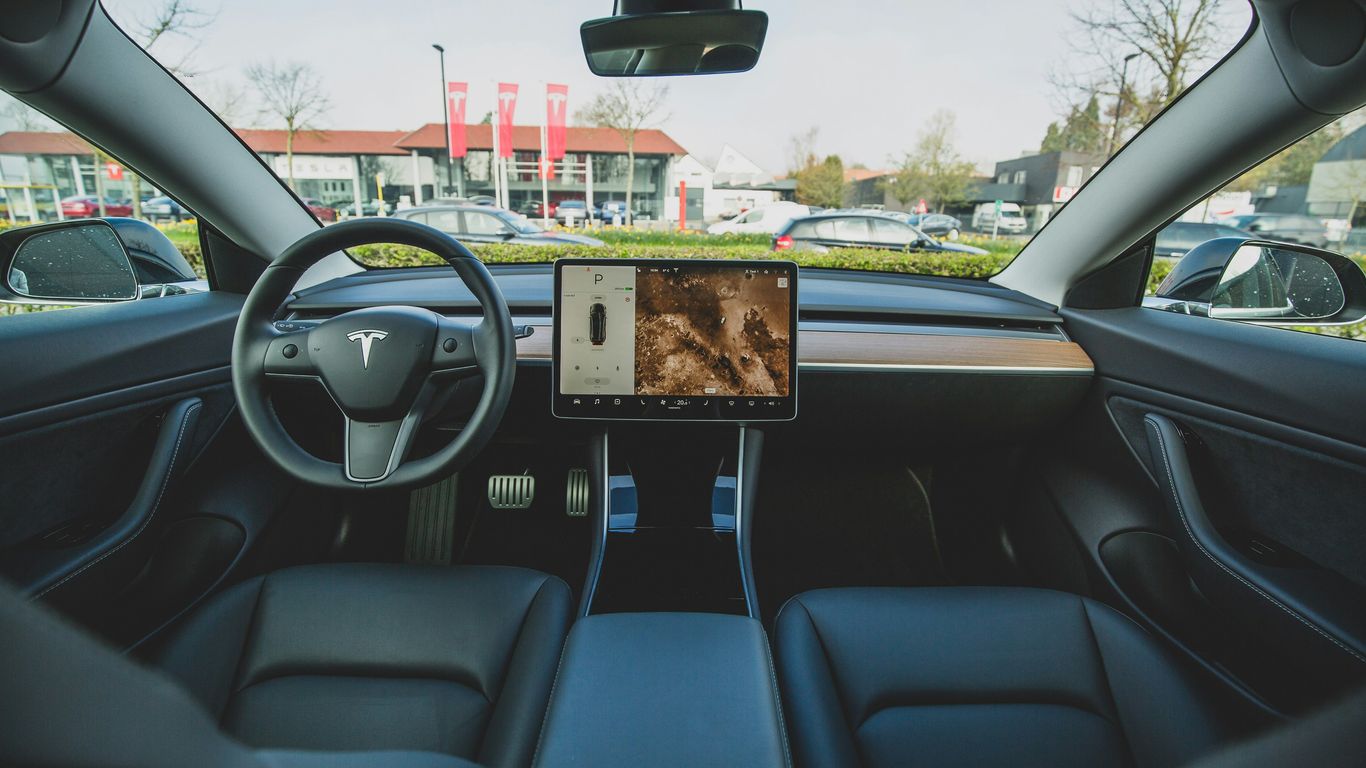
Understanding the Touchscreen: Get familiar with the main controls, settings, and how to adjust common features like climate control and mirrors.
Basic Driving Controls: From engaging drive and reverse to using the turn signals and wipers, these videos cover the fundamentals.
Understanding Key Features Through Video Guides
Once you've got the basics down, it's time to explore what makes your Tesla special. These guides break down some of the more unique and useful features.
Charging Basics: Understand how to charge at home and at public Superchargers. We'll cover charging speeds and best practices.
Autopilot Introduction: Get a clear explanation of what Autopilot is, how to engage it, and what it can do for you on the road. Remember, it's a driver-assist feature, not a self-driving system.
Infotainment System: Explore the music, navigation, and other entertainment options available through the car's screen.
Navigating Your Tesla's Technology
Tesla's technology can seem complex at first, but these videos aim to simplify it. They focus on making the advanced features accessible and easy to use.
The goal here is to demystify the tech. You'll learn how to customize your driving experience, use voice commands effectively, and understand the various alerts and indicators your car provides. It's all about building your confidence behind the wheel.
Here's a quick look at what you can expect:
Voice Commands: Learn the phrases that work best for controlling your car without taking your hands off the wheel.
App Integration: See how the Tesla mobile app can be used for remote control, monitoring, and more.
Software Updates: Understand how Tesla updates its software and what new features you might get.
In-Depth Tesla Model Guides
Videos focused on the Model 3 are perfect for anyone just starting out or wanting to brush up on the basics. These tutorials break things down clearly so you're not stuck searching menus or clicking random buttons. If you've opened the glove box for the third time instead of turning on your lights, you're definitely not alone.
Common Model 3 tutorial topics:
Screen navigation and favorite shortcuts
Safety settings, including Dashcam and Sentry Mode
Efficient use of climate controls and seat heaters
Short guides like the Tesla Model 3 owner's manual are really handy when you want help understanding video recording features or what kind of USB drive you'll need. It's not always obvious at first glance.
Don't skip over step-by-step videos, especially the ones on setting up profiles and basic maintenance. A little time with the right video can save plenty of future headaches.
Whether you drive daily or pack everything into your Model Y for a road trip, certain tutorial videos make life simpler. Many owners say they discover surprising hidden features even after months of ownership.
Here's what Model Y video guides usually cover:
Setup walk-throughs: profiles, mirrors, and display tweaks
Using the large cargo area (real-world loading examples)
Understanding advanced safety and driver assist features
A lot of these videos also mention the must-have accessories for Model Y—like all-weather mats or trunk organizers. Sometimes, a quick guide on installing a floor mat or a seat cover is the difference between an organized car and that classic chaos after a busy weekend.
The Model S and Model X are loaded with extra features, so video tutorials aimed at these cars are helpful for both new and longtime drivers. The touchscreen systems differ from other Teslas, and many videos point out differences owners weren't expecting.
Popular Model S/X walkthroughs:
Personalizing your driving experience (profiles, navigation)
Advanced seating and storage tips (folding, adjusting, kid-friendly options)
Managing software and performance upgrades
Here's a quick table summarizing common video topics and their usefulness for S/X owners:
Feature | Why Owners Watch Videos |
|---|---|
Suspension adjustments | Ride comfort & clearance |
Rear seat entertainment | Setup and troubleshooting |
Charging setups | Home vs public charging |
Watching the right videos before trying new features can help avoid mistakes—like accidentally adjusting the suspension while parked in the garage (it happens). Just a few minutes can give you a smoother experience as you get to know your Tesla.
Practical Tesla How-To Videos
Getting a new Tesla is exciting, but there's a learning curve. Luckily, there are tons of videos out there to help you with the day-to-day stuff. These aren't about the fancy tech features, but the real-world things you'll do all the time.
Charging Your Tesla: A Video Tutorial
Charging is probably the biggest change from a gas car. Videos can show you the best ways to charge at home, at work, or on the go using Superchargers. You'll see how to plug in, what the different charging lights mean, and how to set charging schedules. It's good to know how to check your battery health too, which you can do right on the touchscreen. Learn about battery health.
Maximizing Range with Tesla Tutorial Videos
Range anxiety is a thing, but videos can help you get the most miles out of every charge. They cover topics like how driving style affects range, the impact of weather, and how to use features like 'Hold' or 'Chill' mode to conserve energy. You'll also find tips on preconditioning your battery before a drive, especially in colder weather.
Maintenance and Care Through Tutorials
Keeping your Tesla in good shape doesn't have to be complicated. Many videos walk you through simple maintenance tasks. This could include things like cleaning your car properly, checking tire pressure, or even how to replace your cabin air filters. These guides make it easy to keep your car running smoothly and looking its best. You can also find videos on how to use the Tesla mobile app for remote monitoring and basic service requests. The official Tesla YouTube channel is a great place to start for official guidance on car operation.
Enhancing Your Tesla Experience
Upgrading your Tesla isn’t just about looks—it’s about making day-to-day driving smoother, more fun, and personalized to the way you live. With so many add-ons and apps out there, figuring out what actually improves your experience can be a hassle. The right tutorial videos and reviews can clear up the confusion before you buy or install anything unexpected.
Must-Have Tesla Accessories: Video Reviews
Every owner has a different take on what works best, but certain accessories come up again and again in video reviews as game-changers:
All-weather floor mats – Simple, but they save your interior from shoes, spills, and pet messes.
Magnetic phone mounts or wireless chargers – Keeps navigation accessible, cables tangle-free.
Center console organizers – Perfect for sunglasses, snacks, or loose coins.
Protective screen covers – Essential for preventing scratches on your main control.
Trunk/frunk storage bins – Especially useful if you find yourself lugging groceries or road-trip gear.
A lot of these reviews highlight not just what to buy, but also show real installs and talk through the pros and cons—so you’re not surprised by poor fit or wasted money. For a look at best sellers and advice tailored to your Tesla, check out this comprehensive guide for new owners.
Accessories can quickly transform your Tesla—from a bare-bones commuter to something you look forward to driving, rain or shine. Don’t underestimate how much small upgrades matter.
Customization and Upgrades: Tutorial Videos
Tesla’s style can be kept clean or made more personal, and you don’t have to be a car nerd to get started. Good how-to videos will walk you through:
Adding wraps or decals without damaging paint.
Swapping out factory wheels or lug nut covers.
Installing dash or ambient LED lighting strips.
Upgrading pedals, steering wheels, or even seats on a budget.
Setting up custom horn sounds (yes, really).
The best part is that these mods often require just a basic tool kit and some patience. Just remember that if you mess up—a lot of tutorial creators also show how to undo mistakes or reverse an install.
Utilizing Tesla Apps and Software Updates
Tesla apps keep getting smarter, and so should your use of them. There are plenty of videos out there about:
Remote climate control: How to preheat or cool your car before you get in.
Setting up charging schedules to save on electricity.
Finding, downloading, and trying out official and third-party Tesla apps for mapping, music, security, and more.
Tips to update your Tesla’s software and what to expect when a new version drops.
Here’s a quick look at what you get from some of the most downloaded Tesla apps:
App Feature | What It Does | Common Use |
|---|---|---|
Vehicle Preconditioning | Controls climate remotely | Winter/summer prep |
Trip Planning | Calculate charging stops and times | Road trips |
Sentry Mode Monitoring | Sends alerts and footage to your phone | Security peace |
Detailed Charging Logs | Tracks sessions, cost, and efficiency | Money saving |
If you experiment with new software or apps, most content creators recommend keeping notifications on—Tesla loves to push out quirky new features overnight. Tutorial videos are often the fastest way to see what’s changed and how to actually use new features in the real world.
Advanced Tesla Features Explained
Tesla’s tech really comes alive once you start digging into some of the advanced features. This part isn’t just bells and whistles—it changes the way you drive, park, and interact with your car. Below, I’ll walk through must-watch tutorial videos that make the complicated stuff much simpler.
Autopilot and Driving Assistance Tutorials
If you just picked up your new Tesla and the word "Autopilot" felt a bit overwhelming, you’re not alone. Autopilot is a big deal for Tesla owners, but it does take some practice and clear instructions—this is where good video guides save the day. Here’s what to look for in the best Autopilot video tutorials:
How to activate Autopilot for the first time, including step-by-step button presses and screen taps.
What to expect from Traffic-Aware Cruise Control and Lane Keeping, and how they keep you safe.
Real-world examples: merging onto highways or stopping at lights.
Common situations where Autopilot might disengage and what to do if it happens.
Explanation of Full Self-Driving (FSD) features if your Tesla has them, with simple demos of Navigate on Autopilot and Smart Summon.
Most owners say the difference between reading about Autopilot and actually seeing it in action (with honest commentary) is like night and day. Practicing with a clear guide helps you build trust with the system much faster.
Voice Commands and Infotainment Guides
Controlling your Tesla without ever taking your hands off the wheel is one of those things that feels futuristic until you realize just how practical it is. Still, the sheer number of commands can be confusing at the start. A good tutorial video will:
List and demonstrate common voice commands for navigation, music, climate, and more.
Show tips for speaking clearly so the system understands—accents, volume, phrasing.
Highlight any new features with each major update, like calendar integration or messaging.
Run through how to troubleshoot when the system mishears you (it happens to all of us).
Here’s a quick table with some voice commands to try on day one:
Purpose | Command Example |
|---|---|
Set Navigation | "Navigate to 123 Main Street" |
Adjust Temperature | "Set temperature to 72" |
Play Music | "Play The Beatles on Spotify" |
Open Trunk | "Open the trunk" |
Call Contact | "Call Sam" |
Understanding Tesla's Software Updates
Tesla’s updates are a bit like waking up on Christmas morning—except instead of socks, you sometimes get better range or brand-new games. Here’s what video walkthroughs tend to cover for software updates:
How to check for and install updates through your car’s touchscreen and smartphone app.
What new features were added (with quick reviews or road tests of those features).
Tips for staying up-to-date without missing out, especially if you park somewhere with spotty Wi-Fi.
Explanation of release notes and how to find them for past updates too.
Best practices for troubleshooting during or after a new update (reboots, resets, etc.).
Watching these update tutorials helps take the stress out of the unknown—especially since the car can feel different after new software. Aim to check out one or two reliable channels that show each new update, so you know what’s changed before your next drive.
Whether you’re here for automated driving, voice controls, or simply getting new features every couple months, these videos make it all feel less intimidating. No one figures it all out in a day—it’s about learning step by step, at your own pace, usually with a helpful YouTuber making mistakes for you first.
Choosing the Right Tesla: Buyer's Guides
So, you're thinking about getting a Tesla, huh? That's awesome! But with different models and so many features, it can feel a bit much trying to figure out which one is the best fit for you. Don't worry, there are plenty of video resources out there to help clear things up.
Comparing Tesla Models: Video Insights
When you're looking at the different Tesla cars, it's super helpful to see them side-by-side. Videos can really show you the differences in size, how they drive, and what kind of space you get. You can find comparisons that break down things like cargo room, passenger comfort, and even how they handle on the road. It's all about finding the car that matches your lifestyle. For instance, if you need more room for family or gear, a video showing the interior of a Model Y might be exactly what you need to see. You can also check out guides that compare the performance specs, like 0-60 times and battery range, to see which car feels like the right speed for you.
Features and Performance: Tutorial Breakdowns
Beyond just the model itself, each Tesla has a bunch of cool tech. Videos are great for explaining things like Autopilot, the big touchscreen interface, and even the unique door handles. You'll find tutorials that walk you through how to use specific features, so you know what you're getting before you buy. Some videos even do real-world tests, like seeing how well a car handles in different weather or how long the battery really lasts on a long trip. This kind of practical information is gold when you're trying to decide.
Making Your Purchase Decision with Video Resources
Ultimately, watching videos can make the whole buying process feel less intimidating. You can get a feel for the car, understand its capabilities, and even see how accessories might fit in. Think about what's most important to you – is it range, passenger capacity, or maybe just the look and feel? Videos can help you weigh these factors. For example, if you're curious about the practicality of the third row in a Model Y, there are videos that specifically address whether it's suitable for kids [d080]. Seeing these things in action, explained by people who actually use them, makes a big difference. It helps you feel more confident that you're making the right choice for your new electric ride.
Picking the perfect Tesla can feel like a big decision. Our "Choosing the Right Tesla: Buyer's Guides" section is here to help you sort through all the options. We break down each model so you can find the one that fits your life best. Ready to find your dream electric car? Visit our website to explore the guides and start your journey today!
Wrapping Up Your Tesla Journey
So, there you have it. Getting a new Tesla is exciting, but it can also feel like a lot at first. We've looked at some helpful videos that can really make a difference, whether you're figuring out the basics or looking for ways to make your car even better. Think of these tutorials as your friendly guide, making sure you get the most out of your electric ride without any of the usual headaches. Happy driving!
Frequently Asked Questions
What are the best videos for someone who just got a Tesla?
For new Tesla owners, start with videos that cover the basics. Look for tutorials on setting up your Tesla app, understanding the charging process, and getting familiar with the car's main controls and features on the screen. These will help you feel comfortable and confident driving your new electric car right away.
How can I learn about the different Tesla models?
If you're trying to decide which Tesla to buy or just want to know more, watch videos that compare models like the Model 3, Model Y, Model S, and Model X. These guides often show you the differences in size, features, and how they perform, which can help you pick the best one for your needs.
Are there videos that show how to charge a Tesla?
Yes, absolutely! Charging is a big part of owning an electric car. You can find many videos that explain how to use Tesla's Superchargers on the go, how to charge at home, and tips for making sure your battery stays healthy. They make charging simple and easy to understand.
What kind of videos help with Tesla maintenance?
For keeping your Tesla in good shape, look for 'how-to' videos. These can show you simple things like cleaning your car, checking tire pressure, or even how to install accessories yourself. They're great for learning how to take care of your car without needing a mechanic for every little thing.
Where can I find videos about Tesla's Autopilot and driving features?
Many videos focus specifically on Autopilot and other driver-assist features. These tutorials explain how they work, how to use them safely, and what they can do to make your driving experience easier and more secure. It's important to watch these to understand the capabilities and limitations.
Are there videos that review Tesla accessories?
Definitely! There are tons of videos reviewing accessories like floor mats, screen protectors, phone chargers, and organizers. Watching these reviews can help you see what products are worth buying to make your Tesla more comfortable, organized, or stylish, and they often show you how to install them too.




Comments